 Platform
Your entire operations layer. Running inside Slack.
Foqal isn't a Slack bot or a webhook connector. It's the ops platform that lives natively inside Slack - so every request gets captured, routed, and closed without anyone leaving the channel they're already in.
Not a notification. An operations layer.
Here's what's different about Foqal running natively in Slack versus getting Slack alerts from another tool.
Any message becomes an AI-handled request - instantly.
Any message in Slack or Teams can be turned into a structured, tracked request automatically or with one click (shortcut, channel menu, emoji). AI triages and resolves it when possible. If it can't, it routes to the right human with full context - original message, thread, and attachments included.
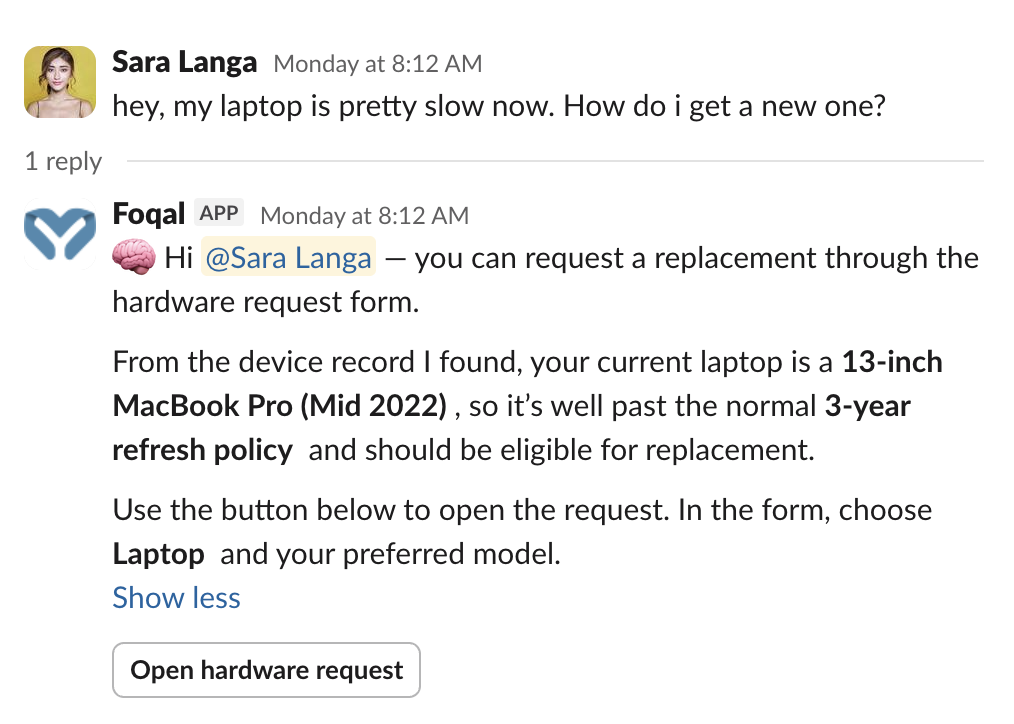
IT, HR, and support in one Slack - structured and separate.
Foqal isn't a single-team tool. Every function that handles requests can run on it simultaneously - in the same Slack workspace, with completely separate queues and visibility rules.
IT in #it-help
Every device request, access question, and incident report captured, routed, and resolved. SLA tracking runs in the background. Nothing disappears into a DM.
HR in #people-ops
Benefits questions, onboarding requests, and sensitive matters - handled privately in Slack with full conversation history and compliance-ready audit trails.
Customer support across Slack Connect
Every customer channel unified into one queue. SLA tracking from first message to close. The structure to commit to Slack as a serious support channel.
ITSM across your service catalog
Structured request types, change management, and audit trails - running inside Slack, not alongside it.
8 ways to create requests in Slack
For employees, it's just Slack. For your team, everything that happens next is structured, automated, and tracked.


Click "Create Request" to get started
A persistent menu at the bottom of every monitored channel lets anyone create a request with one click. The original message, thread context, and attachments come with it automatically.
- Visible in every monitored channel
- One-click request creation
- Full thread context preserved
- Attachments included automatically
Right-click any message to convert it into a structured request. Works on any message in any channel - even ones sent before Foqal was installed.
- Right-click any message to create a request
- Works on historical messages
- Preserves original sender context
- No re-typing required
Configure any emoji as a request trigger. React to a message with your custom emoji and Foqal captures it as a request - perfect for urgent escalations or specific request types.
- Any emoji can become a trigger
- React to escalate instantly
- Configure per request type
- Works across all channels
Type /foqal to create a request from anywhere in Slack. The command opens a structured form that routes to the right queue with all required fields captured upfront.
- Create requests from any channel
- Structured intake forms
- Required fields captured upfront
- Routes to correct queue automatically
Click "Create Private Request" to get started
Sensitive requests stay confidential. Private mode creates a thread visible only to the requester and assigned agents - perfect for HR matters, security incidents, or personnel issues.
- Confidential conversations
- Visible only to assigned agents
- Full audit trail maintained
- Compliance-ready records
 Foqal AgentDM with Foqal Agent
Direct messages to support accounts become tracked requests automatically. Nothing disappears into an unmonitored inbox - every DM is captured, routed, and reportable.
- DMs become tracked requests
- No messages lost to inboxes
- Automatic routing and assignment
- Full conversation history
Every request lives in its own thread. The full conversation - questions, updates, resolutions - stays together in one place, making it easy to find context and maintain history.
- All context in one thread
- Easy to find past conversations
- Complete history preserved
- No scattered information
Direct messages to support accounts become tracked requests automatically. Nothing disappears into an unmonitored inbox - every DM is captured, routed, and reportable.
- DMs become tracked requests
- No messages lost to inboxes
- Automatic routing and assignment
- Full conversation history
Every request lives in its own thread. The full conversation - questions, updates, resolutions - stays together in one place, making it easy to find context and maintain history.
- All context in one thread
- Easy to find past conversations
- Complete history preserved
- No scattered information
A persistent menu at the bottom of every monitored channel lets anyone create a request with one click. The original message, thread context, and attachments come with it automatically.
- Visible in every monitored channel
- One-click request creation
- Full thread context preserved
- Attachments included automatically
Right-click any message to convert it into a structured request. Works on any message in any channel - even ones sent before Foqal was installed.
- Right-click any message to create a request
- Works on historical messages
- Preserves original sender context
- No re-typing required
Configure any emoji as a request trigger. React to a message with your custom emoji and Foqal captures it as a request - perfect for urgent escalations or specific request types.
- Any emoji can become a trigger
- React to escalate instantly
- Configure per request type
- Works across all channels
Click "Create Request" to get started
What Slack-first teams accomplish with Foqal.
The requests your team handles every day - running inside Slack.
User Provisioning
Access requests route to the right manager in Slack, trigger provisioning in Okta or Google Workspace, and close with a full completion log.
Access Management
Every access decision approved in Slack, logged automatically, and exportable for audit - without anyone reconstructing it from thread history.
Employee Onboarding
One Slack request triggers account creation, hardware ordering, payroll enrollment, and orientation scheduling simultaneously.
Incident Response
Urgency detected, responders notified, stakeholders updated - all inside Slack, without anyone manually coordinating the response.
See all use cases
Explore more Slack automation workflows
The tools Slack-first teams run alongside Foqal.
Foqal connects bi-directionally to the tools your team already uses - so actions triggered in Slack update your systems of record automatically.
Stop chasing requests. Let them come to you.
You chase the work
You
Work comes to you
You in Slack
FoqalEvery team running operations in Slack uses Foqal for this.
IT is where most teams start. But the same platform handles HR, customer support, and cross-functional operations - without any structural changes.

IT Help Desk
Every IT request captured and routed automatically - across Slack, Teams, and email. Nothing disappears into a DM.

IT Operations
Structured request management, SLA tracking, and a full audit trail - running inside Slack and Teams, not alongside them.

HR & People Ops
Benefits questions, onboarding requests, and sensitive conversations - handled in Slack with the privacy and structure HR actually needs.

Customer Support
One inbox for every Slack Connect channel. SLA tracking from first message to close. The confidence to commit to Slack support and charge for it.
IT Help Desk
Every IT request captured and routed automatically - across Slack, Teams, and email. Nothing disappears into a DM.
IT Operations
Structured request management, SLA tracking, and a full audit trail - running inside Slack and Teams, not alongside them.
HR & People Ops
Benefits questions, onboarding requests, and sensitive conversations - handled in Slack with the privacy and structure HR actually needs.
Customer Support
One inbox for every Slack Connect channel. SLA tracking from first message to close. The confidence to commit to Slack support and charge for it.
IT Help Desk
Every IT request captured and routed automatically - across Slack, Teams, and email. Nothing disappears into a DM.
IT Operations
Structured request management, SLA tracking, and a full audit trail - running inside Slack and Teams, not alongside them.
HR & People Ops
Benefits questions, onboarding requests, and sensitive conversations - handled in Slack with the privacy and structure HR actually needs.
Customer Support
One inbox for every Slack Connect channel. SLA tracking from first message to close. The confidence to commit to Slack support and charge for it.

Your team is already in Slack. Your operations should be too.
See how IT, HR, and support teams use Foqal to run their entire operations inside Slack - without asking employees to change how they work.